Find advanced filters
Once advanced filters are created and saved, you can view them in a list. Select the filter to see the results, and bookmark it to view it in the list of bookmarked filters.
To find advanced filters:
From the project with the existing filters you want to view, select Filters.
Hover your cursor over the filter name to see who created the filter.
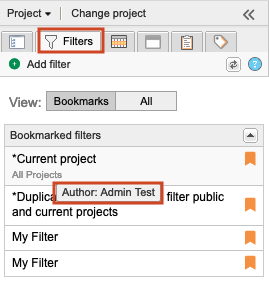
The name of the user that created the filter is displayed.
Important
An organization admin can delete a filter when it's no longer needed. Before deleting a filter, make sure it isn’t shared. When a shared filter is deleted, even if you're not the creator, it's deleted for everyone.